


Beauty Camera Sweet Makeup App
4.729.00 Reviews
App Specs
- Version
- 1.2.0
- Updated On
- License
- Free
- Downloads
- 10,000,000+
- Developer
- Wolf Kan
- Categories
- Photography
- Platform
- Android
Screenshots
 Analysis by AppCompare
When I have only a minute to take a selfie before heading out, I want a camera that lets me check the look in the frame rather than opening several editors afterward. That is the kind of quick, portrait-focused job I had in mind when trying Beauty Camera Sweet Makeup App. It is a free photography app from Wolf Kan, rated for Everyone, and its focus is beauty effects, makeup-style changes, and body-shape editing. I found it most useful as a playful way to prepare a photo, not as a substitute for a careful portrait-editing workflow.
A good fit for quick, casual portraits
The app makes most sense if you regularly take selfies, want to experiment with a softer or more dressed-up look, or prefer to see an effect while composing the shot. Someone preparing a profile picture, a birthday greeting, or a quick photo to send to friends can get value from that direct approach. The appeal is less about mastering a complicated editor and more about trying a look without needing separate makeup tools or a long editing session.
That convenience also sets a sensible boundary. If you mainly photograph landscapes, products, pets, or groups, a selfie-oriented beauty camera is unlikely to become your everyday camera. And if you want precise retouching, layered edits, or detailed control over lighting and color, a general-purpose photo editor is usually the better place to finish the job. I would treat this app as a focused portrait tool rather than expecting it to cover every kind of photography.
From choosing a look to taking the picture
My preferred workflow is to start with the lighting and framing, then try a restrained effect before taking the photo. In a live camera, a filter can be appealing on screen but feel heavier once the picture is saved, so I would compare a natural option with a more noticeable one before committing. A plain background and light facing the subject also make it easier to judge whether the makeup effect is helping or simply drawing attention to itself.
For a quick everyday example, imagine taking a selfie by a window before joining a video call or sending a photo to a friend. I would first check that the face is evenly lit, preview a subtle makeup look, and take a couple of versions rather than relying on one heavily styled shot. That small habit gives me a choice later and makes it easier to keep the result looking like me. The app’s live-effect approach is handy here because I can assess the overall feel before pressing the shutter.
Makeup tools are also best approached one change at a time. I would try lipstick or blush first, inspect how it sits against the lighting, and only then add another element such as eyeshadow or a different eye color. Changing several things at once makes it harder to tell which adjustment is working, especially when the camera preview is already applying a beauty filter. For a believable portrait, a little restraint often produces a more usable result than choosing the most dramatic combination.
Where it sits among camera and editing apps
Compared with a standard phone camera, a beauty camera is more convenient when I already know I want a styled selfie: I can preview the look as I compose instead of taking a picture, opening another app, and trying to recreate it. The trade-off is purpose. A regular camera is the more dependable choice for everyday scenes and for keeping a straightforward, unaltered image, while a broad photo editor is stronger when I want to refine a finished picture with more deliberate control.
Worth Reading Before You Choose

EA SPORTS FC Mobile 26 Is a Bigger Football Game, but It Takes Time

Flipboard Shows What News Apps Must Do Beyond the Feed

Switching to Android Auto Means Rethinking Your Driving Routine

Google Calendar Makes a Crowded Week Easier to Manage

Ludo King Makes the Most of the Minutes Between Plans

Baby Panda World Brings Quick Play to Modern Phones, but Its Game Library Feels Busy
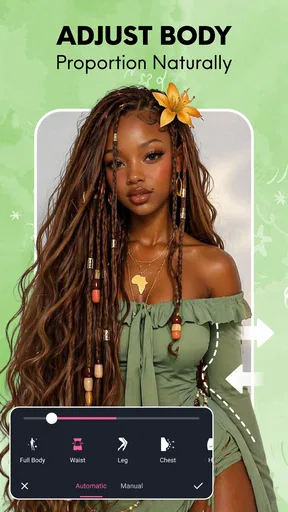
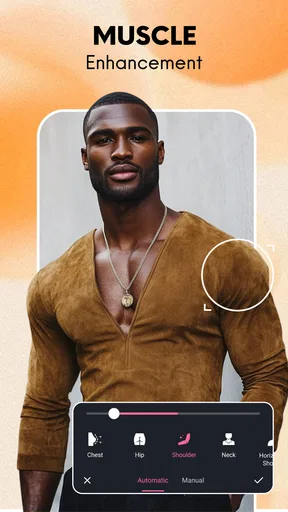
Body-shape editing deserves a separate bit of judgement. It can be useful for playful experimentation or for making a visual change that suits a particular creative idea, but it is also easy to overdo. I would check the edges around the subject and nearby background lines after making an adjustment; bending a straight object or an outline can make an edit look less convincing. If my aim is simply to improve a portrait, I would start with light, framing, and a mild filter before changing body proportions.
One practical handoff is to save a version before sharing it. That gives me a chance to look at the photo outside the live preview, where I can judge the full composition and decide whether the effect still feels right. If I am sending the image to someone who may want the original, keeping an unedited shot as well is a considerate choice. This two-version habit also helps when a filtered picture looks fun in the moment but feels too strong later.
The app is free to install, with optional in-app purchases ranging from $0.99 to $49.99 per item. I would explore the basic experience before paying for anything and make sure a particular paid option is genuinely useful to me. Its average rating is 4.7 from around 56,000 ratings, and it has passed 10 million installs. Those figures suggest broad interest, but they do not tell me whether its style will suit every face, device, or taste, so I would still judge it by my own test shots.
First Impressions and Interface
When I first downloaded the Beauty Camera Sweet Makeup App, I wasn't quite sure what to expect. The download was quick, and I was greeted by a clean and inviting interface. It's colorful but not overwhelming, with everything neatly organized. You know how some apps can be a bit of a maze? This one isn't. The icons are intuitive, making it super easy to navigate, even if you're not the most tech-savvy person around.
There are a bunch of features laid out right on the home screen, and I couldn't wait to dive in. The app offers a variety of tools, from basic photo editing to more advanced makeup application. You can tell it's designed with the user in mind, which is always a plus in my book.
Features That Stand Out
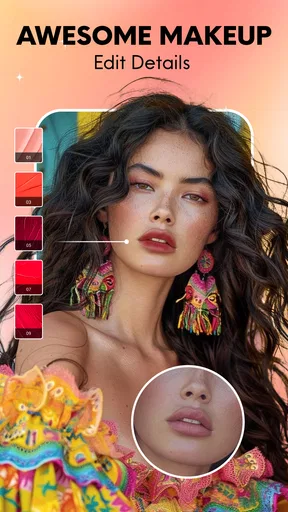
Now, let's talk about what this app can actually do. The makeup tool is probably the star of the show here. With just a few taps, you can add lipstick, blusher, eyeshadow, and even change your eye color. It's like having a virtual makeup artist right in your pocket!
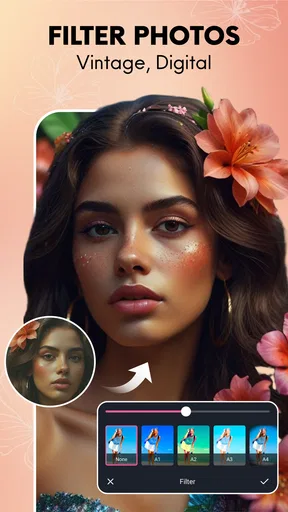
The app also includes a variety of beauty filters. You can choose from different styles, whether you want a natural look or something more glamorous. Each filter has its unique charm, and there's something for everyone. I had a lot of fun experimenting with different looks to see what suited me best.
Another feature worth mentioning is the real-time camera. This lets you apply effects and makeup while you're taking a picture. It's a bit like trying on new makeup at a store, minus the hassle. Plus, it saves a ton of time since you don't have to edit the photos afterward. Just snap and share!
User Experience
Using the app has been a smooth ride. It's responsive, with no noticeable lag, which is crucial when you're trying to capture the perfect moment. The app is also regularly updated, which means you're always getting the best performance and the latest features.
Another thing I appreciated is the app's ability to save high-resolution photos. You know how some apps compress images to the point where they lose quality? Not this one. Your photos come out crisp and vibrant, which is a must for sharing on social media.
And speaking of sharing, the app makes it a breeze. You can directly post your photos to popular social media platforms or save them to your device. It's seamless and quick, which is just what you need when you're eager to show off your latest look.
Realistic expectations and a few useful habits
For the most reliable result, I would take a test shot in the same light I plan to use for the final photo. Indoor lighting can change how makeup colors appear, and a filter that looks balanced near a window may seem stronger under a warm lamp. A short preview saves time later and helps me avoid building a look around a screen preview that does not match the finished image.
I would also keep the camera at a comfortable distance and avoid cropping too tightly while composing. That leaves room to adjust the framing after the shot and makes small face or body edits easier to assess in context. When the subject fills the frame edge to edge, even a modest adjustment can be more noticeable, while a little space around the portrait gives me a better sense of proportion.
People often wonder whether this kind of app is only useful for polished social posts. I think it can also work for a casual avatar, a quick greeting, or a private experiment with makeup colors before deciding what look feels right. The key is choosing the intended audience first: a playful filter may suit a message to friends, while a work profile usually calls for a lighter touch and a more neutral image.
Another question is whether the app should replace a phone’s normal camera. I would not make that switch for every photo. For a spontaneous scene, a group shot, or something where accurate colors matter, I would reach for the standard camera first. For a planned selfie where I want to preview beauty effects as I shoot, this app has a clearer advantage. Keeping both options available is more practical than forcing one camera to handle every situation.
User Experience
Using the app has been a smooth ride. It's responsive, with no noticeable lag, which is crucial when you're trying to capture the perfect moment. The app is also regularly updated, which means you're always getting the best performance and the latest features.
Another thing I appreciated is the app's ability to save high-resolution photos. You know how some apps compress images to the point where they lose quality? Not this one. Your photos come out crisp and vibrant, which is a must for sharing on social media.
And speaking of sharing, the app makes it a breeze. You can directly post your photos to popular social media platforms or save them to your device. It's seamless and quick, which is just what you need when you're eager to show off your latest look.
Who should look elsewhere, and when to stop editing
Although the portrait focus is convenient, it is not automatically the best choice for someone who wants a natural record of a moment. If I am photographing a family occasion, documenting a change over time, or taking an image where likeness matters more than styling, I would keep the original camera photo and avoid beauty adjustments. The same goes for anyone who dislikes filters or wants exact manual control: a conventional editor gives more room to make selective changes without committing to a beauty-camera look.
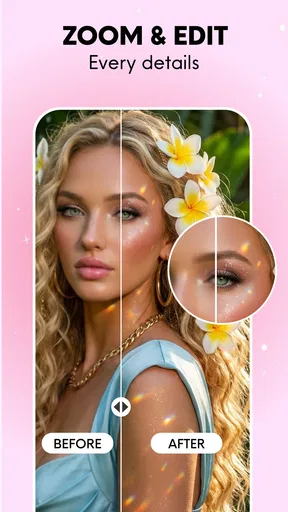
A useful stopping rule is to compare the edited image with the unedited one, then ask whether the change improves the photo or merely makes it look more processed. I find that question particularly helpful with skin smoothing, makeup intensity, and body shaping, because the first preview can make every extra adjustment seem like an improvement. If the face no longer looks familiar or the background begins to look distorted, I would undo the last change rather than trying to fix it with another one.
Before sharing, I would also inspect the image at its intended size. A look that seems subtle when zoomed in may read differently as a small profile picture, and a detail that looks polished on the phone may be less convincing when viewed larger. Saving first and checking the final image gives me a moment to catch that mismatch, choose a gentler version, or decide that the original is the better photo.
Final Thoughts
All in all, the Beauty Camera Sweet Makeup App has been a delightful discovery. Whether you're a selfie enthusiast or just someone looking to enhance your photos with a bit of magic, this app has a lot to offer. It's user-friendly, fun, and packed with features that can transform your photos in a snap.
It's definitely worth giving a shot if you're looking for an app that combines simplicity with powerful editing tools. So go ahead, download it, and let your creativity run wild. You might just find yourself snapping more selfies than ever before!
A final check before making it your regular camera
The current version is 1.1.4, and it runs on Android 7.0 or later. I would check that compatibility before planning to use it on an older device. The app was released on December 25, 2025, so its history is still relatively short; I would make my own judgement from a few ordinary photos rather than assuming a high rating guarantees a perfect fit. Its 26 written reviews are a smaller body of detailed feedback than the broad rating count might suggest, so hands-on testing is especially useful.
My simplest recommendation is to give it a small, low-pressure trial: take one naturally lit selfie, try a restrained makeup effect, save it, and compare it with the untouched photo before sharing. If that workflow feels quick and the result still looks like you, the app earns a place for planned portraits. If you find yourself fighting the styling or prefer precise edits, stick with your regular camera and a general editor. That distinction is what makes this a handy specialist rather than an all-purpose photography app.
Pros
- User-friendly interface and intuitive design.
- Wide range of makeup and filter options.
- Real-time photo editing capabilities.
- Quick sharing to social media platforms.
- High-quality output resolution for images.
Cons
- Contains ads that can interrupt usage.
- Limited features in the free version.
- Occasional glitches while saving edits.
- May require significant storage space.
- In-app purchases can be expensive.
FAQs for Beauty Camera Sweet Makeup App
What features does the Beauty Camera Sweet Makeup App offer?
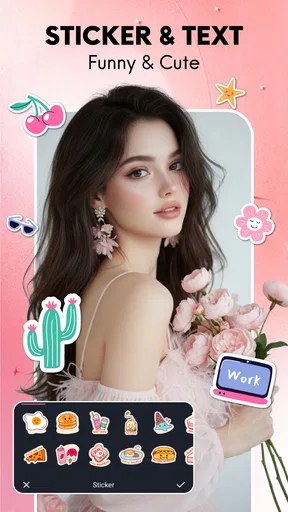
The Beauty Camera Sweet Makeup App provides a wide array of features, including real-time makeup effects, skin smoothing, teeth whitening, and a variety of filters to enhance your selfies. It also includes tools for reshaping facial features, adding accessories, and adjusting lighting to ensure your photos look professional and polished.
Is the Beauty Camera Sweet Makeup App free to use?
Yes, the app is free to download and offers a range of basic features at no cost. However, it includes in-app purchases for premium features, such as exclusive filters and advanced editing tools. These can enhance your editing experience but are optional and not required to enjoy the app.
Does the app require an internet connection to function?
The Beauty Camera Sweet Makeup App can be used offline for taking photos and applying basic filters. However, an internet connection is needed for downloading additional content, accessing online features, and sharing your edited photos directly to social media platforms. This connectivity enhances the app's functionality but is not mandatory for basic use.
How user-friendly is the Beauty Camera Sweet Makeup App for beginners?
The app is designed with a user-friendly interface, making it accessible for beginners. It provides easy navigation with intuitive icons and tutorials to guide users through various features. Whether you’re new to photo editing or experienced, the app offers a seamless experience with helpful prompts and tips to maximize your results.
Is the Beauty Camera Sweet Makeup App safe to use and does it protect user privacy?
The app prioritizes user privacy and data security. It does not store personal photos on its servers, ensuring your images remain private. Additionally, it complies with standard data protection regulations, so you can use the app with confidence. Always review the app's privacy policy for detailed information on data handling.


